by Hunter Mar 25,2025
In *Monster Hunter Wilds*, voice chat is an essential feature for multiplayer interaction, though not everyone may wish to use it. Whether you prefer to communicate or maintain silence, knowing how to adjust these settings can enhance your gaming experience.
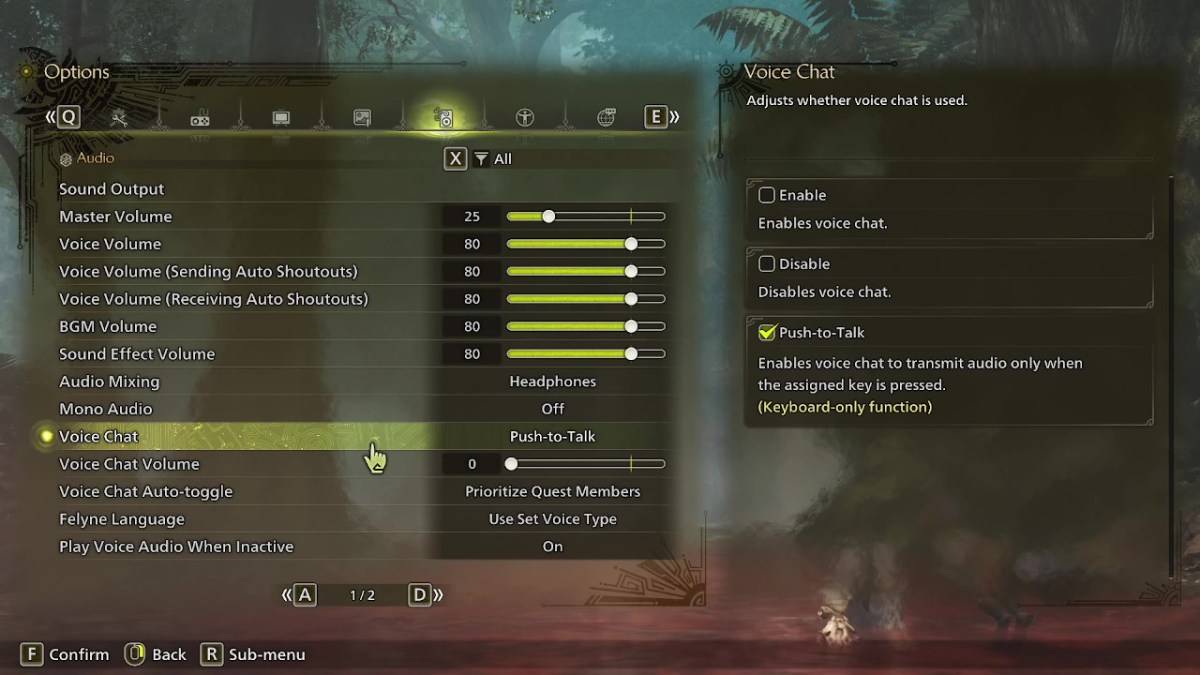
All voice chat settings in *Monster Hunter Wilds* are found in the audio section of the menu. To access them, navigate to the options menu, either in-game or from the main menu screen, and select the tab third from the right. Scroll down to find the Voice Chat setting, which offers three options: enable, disable, and push-to-talk. Choosing 'enable' keeps voice chat constantly active, 'disable' turns it off completely, and 'push-to-talk' allows you to activate voice chat by pressing a designated key on your keyboard, though this feature is limited to keyboard users.
Additional settings include the voice chat volume, which adjusts the loudness of incoming voice chats, and the voice chat auto-toggle. The auto-toggle can be set to prioritize voice chat from quest members, link party members, or to remain static. Quest members are those you're directly playing with in a quest, making this the most commonly used setting. Link members are those in your link party, useful when guiding someone through the game's story, as you might need to wait during their cutscenes.
While the in-game voice chat in *Monster Hunter Wilds* may not match the quality of dedicated communication apps, having the option built-in is beneficial, especially for cross-platform play. For the best experience, consider using external apps like Discord, but the in-game settings are always there when you need them.
Pokemon TCG Pocket: Paralyzed, Explained (& All Cards with ‘Paralyze’ Ability)
Mobile Legends: January 2025 Redeem Codes Released
Android Action-Defense
GWENT: Top 5 Decks for 2025 - Strategies Revealed
Brutal Hack And Slash Platformer Blasphemous Is Coming To Mobile, Pre-Registration Now Live
Pokémon TCG Pocket Is Dropping a Trade Feature and Space-Time Smackdown Expansion Soon
Mythical Island Debuts in Pokemon TCG, Time Revealed
Marvel Rivals Showcases New Midtown Map
Turkey Ends Roblox Ban, Restores Access
Mar 31,2026

Clash Royale Unveils Berserker & Lumberghost in Lumber Love
Mar 30,2026

Little Prince Soars Again in Sky’s Days of Bloom Celebration
Mar 25,2026

Play Together Game Night Wreaked Havoc.
Mar 16,2026

Shop Titans Unleashes Jurassic Era in Tier 15 Update
Mar 11,2026
 Category